Tatsunoko Vs Capcom : Cross Generation of Heroes
| Tatsunoko vs. Capcom: Cross Generation of Heroes | |
|---|---|
 Title Screen | |
| Katakana | タツノコ VS. CAPCOM CROSS GENERATION OF HEROES |
| Developer | Eighting |
| Publisher | Capcom |
| Release date |
2008 2010 (Ultimate All-Stars) |
| Genre | Fighting |
| Control | 8-way Joystick, 4 Buttons |
| Orientation | Horizontal |
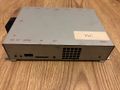
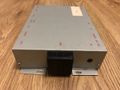
| Arcade hardware | Proprietary Wii-based arcade board |
| Display |
15KHz/31KHz 4:3/16:9 |
| Pinout | JVS |
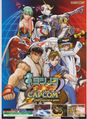
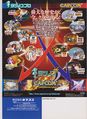
Originally released in Japan for arcades and the Wii video game console in December 2008 as Tatsunoko vs. Capcom: Cross Generation of Heroes, it was later released for the Wii in North America and Europe in January 2010 as Tatsunoko vs. Capcom: Ultimate All-Stars It is a crossover fighting game developed by Eighting and published by Capcom. The game features characters from both Capcom's video game franchises and various anime series produced by Tatsunoko Production.
Gallery
-
 4:3 mode
 -
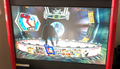 16:9 mode
 -
 Unlocked Characters
 -

-
-

-
-

-

-
-
-

-


Characters
- Tatsunoko
- Ken the Eagle - Science Ninja Team Gatchaman
- Jun the Swan - Science Ninja Team Gatchaman
- Casshan - Neo-Human Casshan
- Tekkaman - Tekkaman: The Space Knight
- Polimar - Hurricane Polimar
- Yatterman-1 - Yatterman!
- Karas - Karas
- Doronjo - Yatterman!
- Gold Lightan - Golden Warrior Gold Lightan
Hidden Characters (see passwords below)
- Hakushon Daimaō - The Genie Family
- Ippatsuman - Gyakuten! Ippatsuman
- Capcom
- Ryu - Street Fighter
- Chun Li - Street Fighter
- Morrigan - Vampire / Darkstalkers
- Alex - Street Fighter
- Batsu Ichimonji - Rival Schools
- Mega Man Volnutt - Mega Man / Rockman
- Kaijin no Soki - Onimusha
- Roll - Megaman / Rockman
- PTX-40A - Lost Planet
Hidden Characters (see passwords below)
- Saki Omokane - Quiz Nanairo Dreams
- Viewtiful Joe - Viewtiful Joe
Additional characters (Only available in the Wii release Tatsunoko Vs Capcom : Ultimate All Stars)
- Tatsunoko
- Joe the Condor - Science Ninja Team Gatchaman
- Tekkaman Blade - Tekkaman Blade
- Yatterman-2 - Yatterman!
- Capcom
- Frank West - Dead Rising
- Zero - Mega Man X / Rockman X
Menus
- RVA Setting Menu - Available by holding the SEL button as you power the board up
- Calendar
- ScreenSetting (This allows changing the aspect ration from 4:3 to 16:9 - make sure you scroll back to the top and click save)
- License
- Test Menu - Available by pressing the SEL button once the board is powered up.
- Display Test
- Input Test
- Output Test
- System Configuration
- Bookkeep Data
- Data Clear & Save
- JVS Status
- Exit & Save
Passwords
Within the System Configuration menu, there is an option to input an 8 digit password(s).
The passwords are used to unlock different amount of characters. Unlike other games such as Street Fighter Zero 3 where codes have be input in a specific order, this game allows passwords to be input individually in any order. For example, PASSWORD LEVEL4 can be input first to unlock all four characters at once.
| Password | Effect | Additional info |
|---|---|---|
| EVFZYJNG | PASSWORD RESETED | Resets game back to PASSWORD LEVEL0 |
| ASKJRFGH | PASSWORD LEVEL1 | HAKUSHON DAIMAŌ now playable |
| YHRCDLKW | PASSWORD LEVEL2 | SAKI OMOKANE (and character above) now playable |
| NJUDXGJE | PASSWORD LEVEL3 | IPPATSUMAN (and both characters above) now playable |
| KUHMFRSW | PASSWORD LEVEL4 | VIEWTIFUL JOE (and all characters above) now playable |
| CAMPSTRT | CAMPAIGN PASS DISP ON | |
| CAMPENDD | CAMPAIGN PASS DISP OFF |
The manual states the following:
(thanks to BuddyC for providing this info)

Dip Switches
| Dip Switch | Setting |
|---|---|
| DIP 1 | ON = 15K OFF = 31K |
| DIP 2 | TBC |
| DIP 3 | TBC |
| DIP 4 | TBC |
| DIP 5 | TBC |
| DIP 6 | TBC |
Manual does not indicate if dip switches 2 - 6 are used.
SD Card Slot

The Arcade System Menu is looking for various folders and then acts upon them in various ways.
| Name | Effect |
|---|---|
| /sysupdate/RVASysMenu.[version].wad | Automatically installs the wad file, it must be signed by "Root-CA10000000".
If the title ID is "00011000-WASU" it will be booted automatically. |
| /import/[name].wad | When holding both the SEL and SET buttons during boot the Arcade System Menu will install the file.
The signer has to match the content of the LockCert.txt file. |
| /deviceinfo | Creates a copy of the system's device certificate at "/deviceinfo/[ID].dvc". |
| /__diag | Forces import when Lockcert.txt is not present. |
| /debug/__debug_rva__ | Unused on retail |
| /__AllClear | Allows you to uninstall the game titles from the system.
The uninstallation has to be confirmed by pressing the SEL button. |
Artwork
Courtesy of Ikotsu
Instruction strip:
https://ikotsu.blogspot.com/2018/07/tatsunoko-vs-capcom-instruction-strips.html
Marquee:
http://ikotsu.blogspot.com/2010/10/tatsunoko-vs-capcom-marquee.html
Manual
TvC_Manual_Page_1-9.pdf
TvC_Manual_Page_10-18.pdf
TvC_Manual_Page_19-27.pdf
TvC_Manual_Page_28-36.pdf
External links
https://tatsunokovscapcom.fandom.com/wiki/Tatsunoko_vs_Capcom_Wikia
https://w.atwiki.jp/tatsucap/
Misc.
Can be powered from a standard Wii Power Supply, meaning owners of PAL Wii devices can use their 240V rated power supplies, without the need of a stepdown.